Features Interface & Player Supported Devices How to Install? Pricing FAQ Contact & Support
Download Android TV / Phone APK Download for Windows

TeviPlayer · IPTV Player · Xtream Codes Player

Your IPTV Subscription, In the Cinematic Player It Deserves.

Connect your Xtream Codes subscription directly to your TV's hardware layer. Stutter-free 4K HDR streams, a smart EPG and seamless cloud sync across your devices.

2-Hour Free Trial • No Card Required • Works With Every Remote

A Movie Theater on Your TV.

Glide through everything with your remote in seconds: the spotlight, the continue-watching row, the live TV guide and a poster-rich movie library on one screen.

Direct Hardware Decode 0 ms Latency with SurfaceView
Tevi Cloud Sync Phone & TV Synced Automatically
4K UHD HDR 5.1 AUDIO 8.8 IMDb
Desert Star
A city lost beneath the sands changes a young explorer's life and everything she knows.
Watch Now
Trailer & Details
NEW EPISODE4KDolby Atmos
Misty Castle · Season 2
An old secret hidden in a fog-covered castle will change the fate of the northern kingdom.
Watch Now
Trailer & Details
4K COLLECTIONHDR10On Every Device
Movie Night
Your film library in cinema quality: hardware-accelerated playback, instant start and resume where you left off.
Watch Now
Trailer & Details
Continue Watching
Synced Across Devices
North
S2:E5 · When the Fog Falls 14 min left
Night City
Movie · 1080p FHD 1 h 12 min
The Cave
S1:E3 · Toward the Light 24 min left
Horizon
Movie · 4K HDR 1 h 48 min
Stage
S3:E1 · The Last Concert 8 min left
Aurora
Documentary · 52 min 31 min left
8interface languages
3platforms: Android TV, phone, Windows
5devices on one account, same progress
2 hoursfree trial, no card needed

Hardware Acceleration

Direct access to your TV's processor through the SurfaceView video layer, with zero stutter.

1080p FHD & 4K Support

From 1080p Full HD movies to 4K streams: zero stutter and a crisp picture on your TV panel.

Tevi Cloud Sync

The second you stop watching on your phone, it shows up on the home screen of the TV in your living room.

No Ads, No Tracking

We show no ads and use no tracking code. Your account password is hashed with PBKDF2; not even we can see it.

Know the Moment a New Episode Drops.

With ordinary IPTV players you dig through categories to find the new episode. Tevi Player follows your favorite series for you: the moment an episode lands in your account, it appears on your screen.
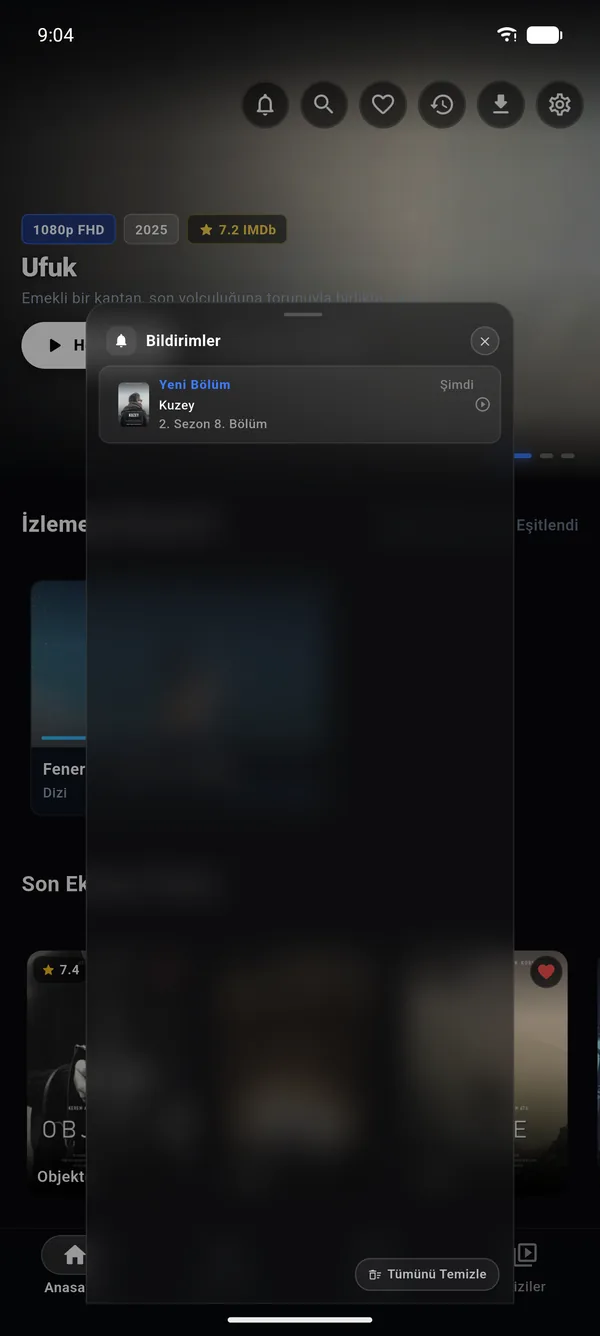
Tevi Player notification center: a new episode of Kuzey
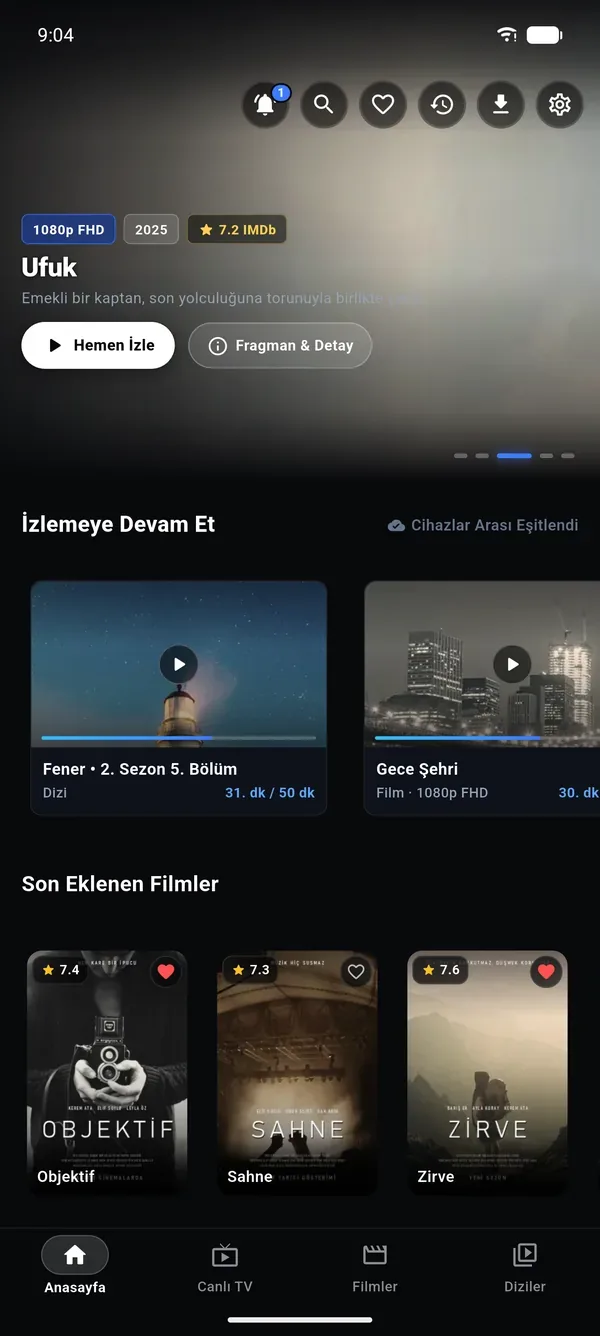
Tevi Player home screen New episode alert: Kuzey, Season 2 Episode 8
  1. Favorite it once

    Tap the heart on the series you follow. Tevi Player takes it from there, so you never browse categories hunting for new episodes.

  2. New episodes come to you

    When an episode is added to your IPTV account, an alert slides in from the top of the screen. Miss it and it waits in the notification center; read it on your phone and it is marked read on your TV and Windows too.

  3. Watch with one tap

    Tap the alert and the new episode starts right away. No searching for seasons or episodes.

Ordinary players You search for new episodes yourself You have to remember where you left off
Tevi Player New episodes come to you Picks up from the episode you left
Smart Resume

Your Episode Is Waiting for You.

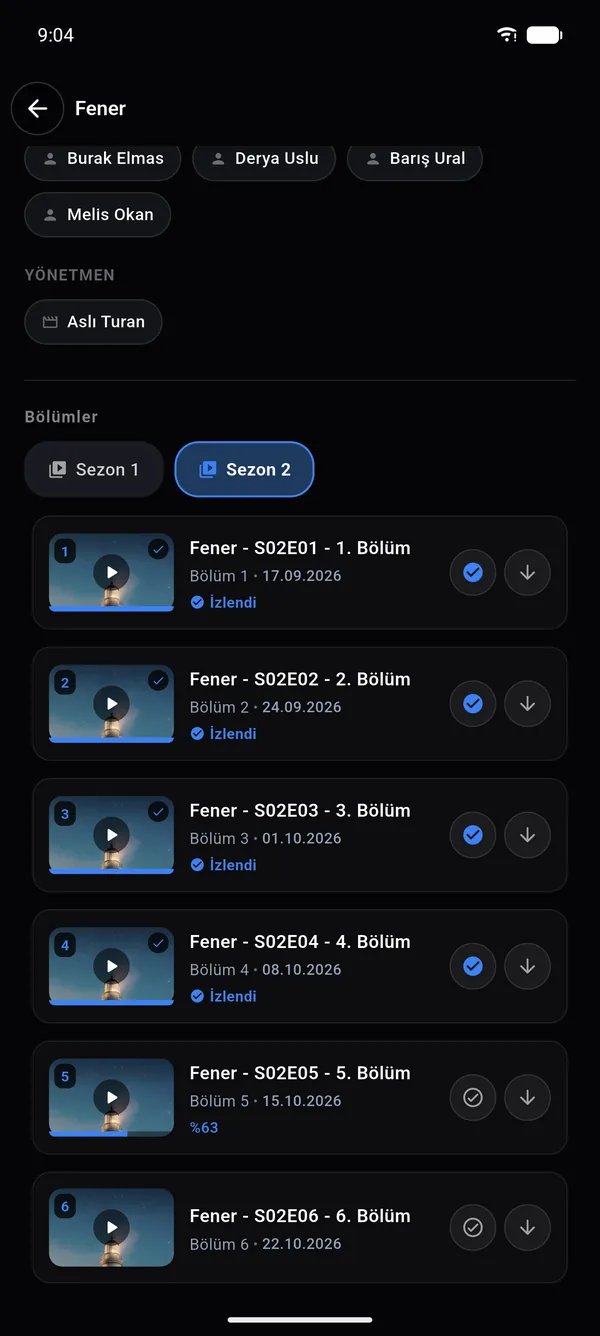
Open a series and the Play button already knows where you left off. Stopped halfway? It resumes from that second. Finished an episode? It starts the next one. Watched episodes are marked, so you never open the same one again by accident.
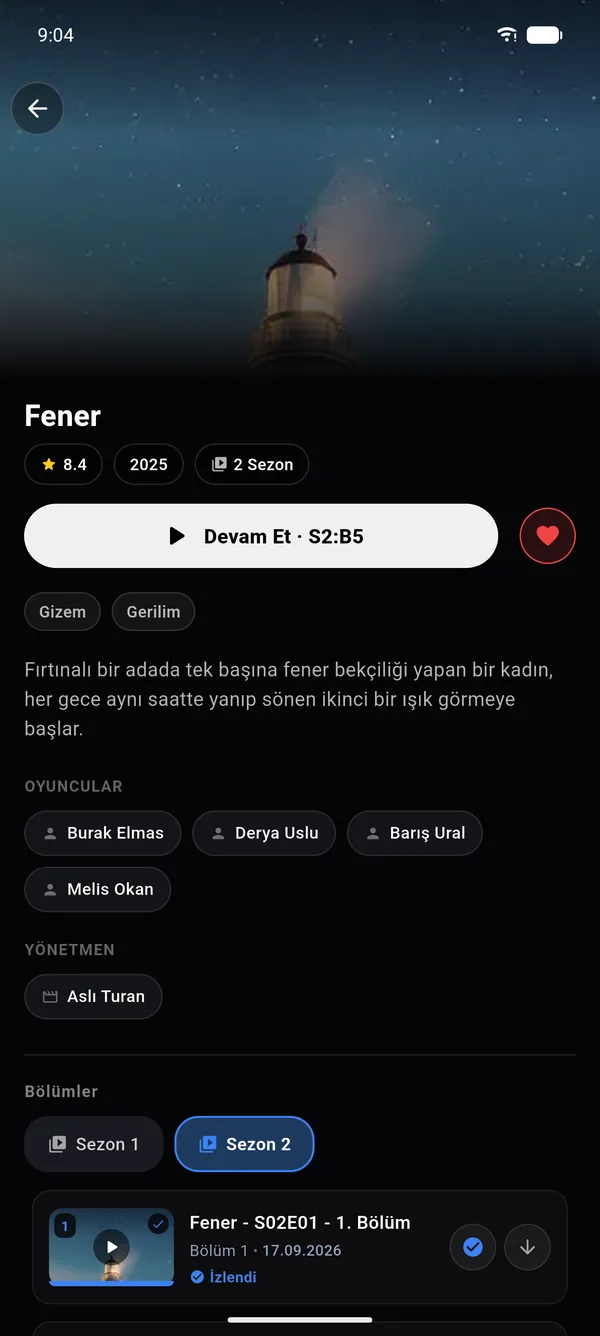
  • The button shows which episode will play
  • The season picker opens on your current season
  • Start on your phone, continue on your TV
Watched episodes are marked, episode 5 is 63% watched
Series page with a Resume S2:E5 button

Everything You Use Every Day, One Tap Away.

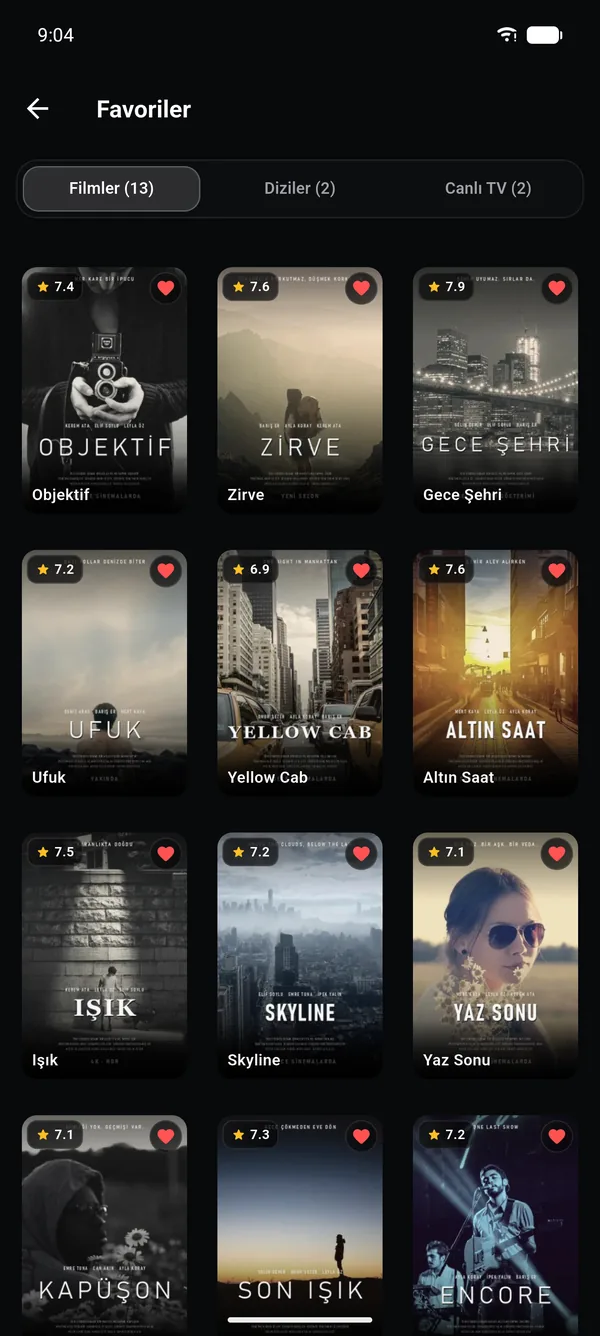
Favorites page with movie, series and live TV tabs
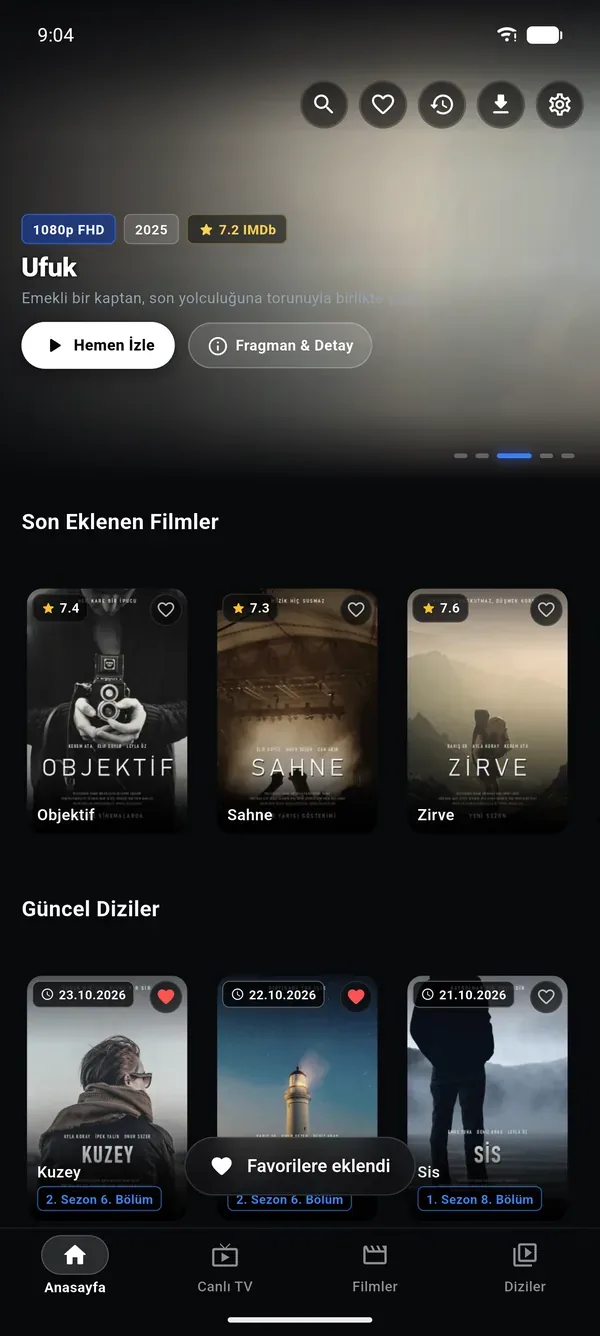
Added to favorites confirmation
Favorites

Everything You Love, One Heart Away.

Save a channel, movie or series by tapping the heart. Favorites live in your Tevi account, so a series you add on your phone is already in your list on your TV and on Windows.

  • Separate filters for channels, movies and series
  • The same list on every device with your account
  • Alerts for new episodes of favorite series
Watch History

Phone, Computer, TV: Always Right Where You Left Off.

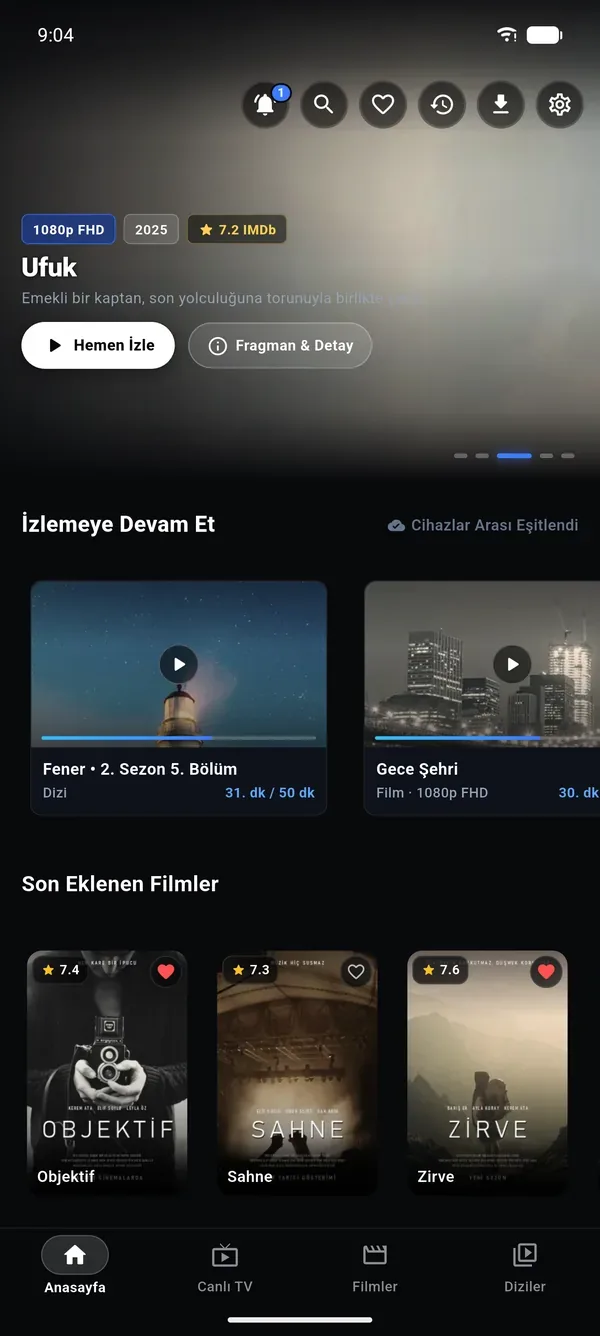
Every movie, episode and channel you watch goes into your history, along with the minute you stopped at. The episode you started on your phone on the way home is waiting at the same second when you open your computer or TV.
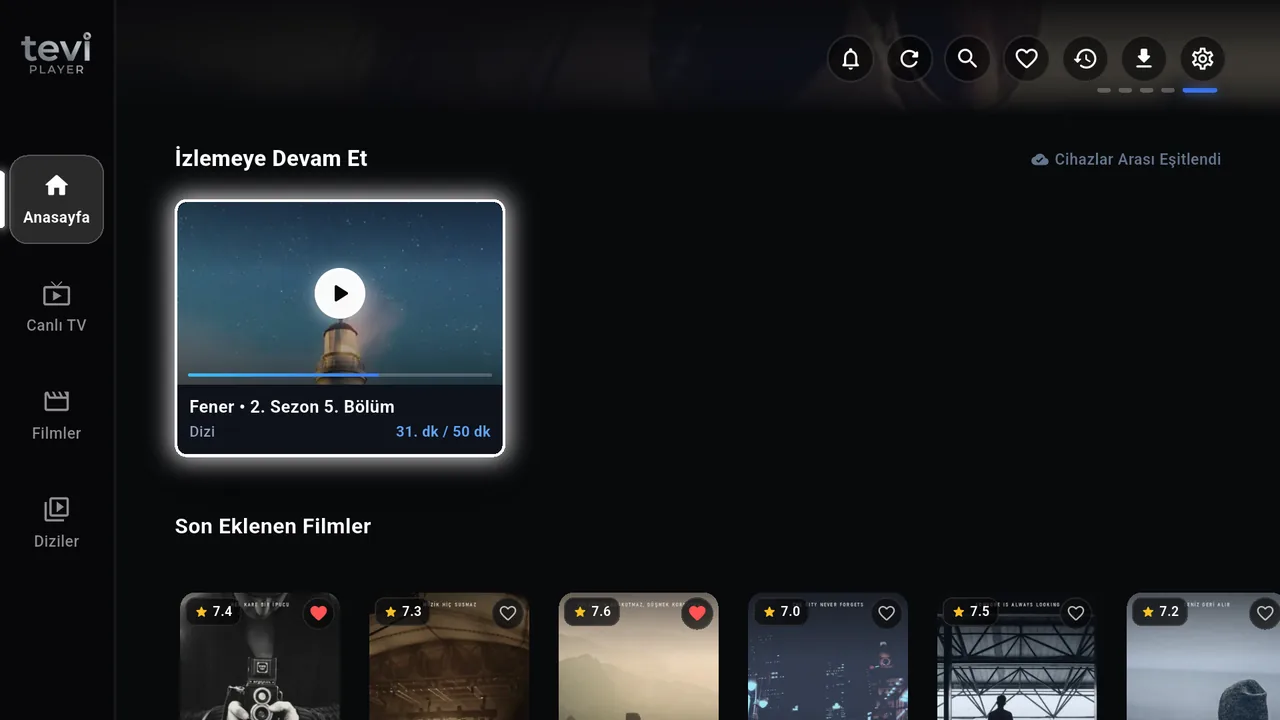
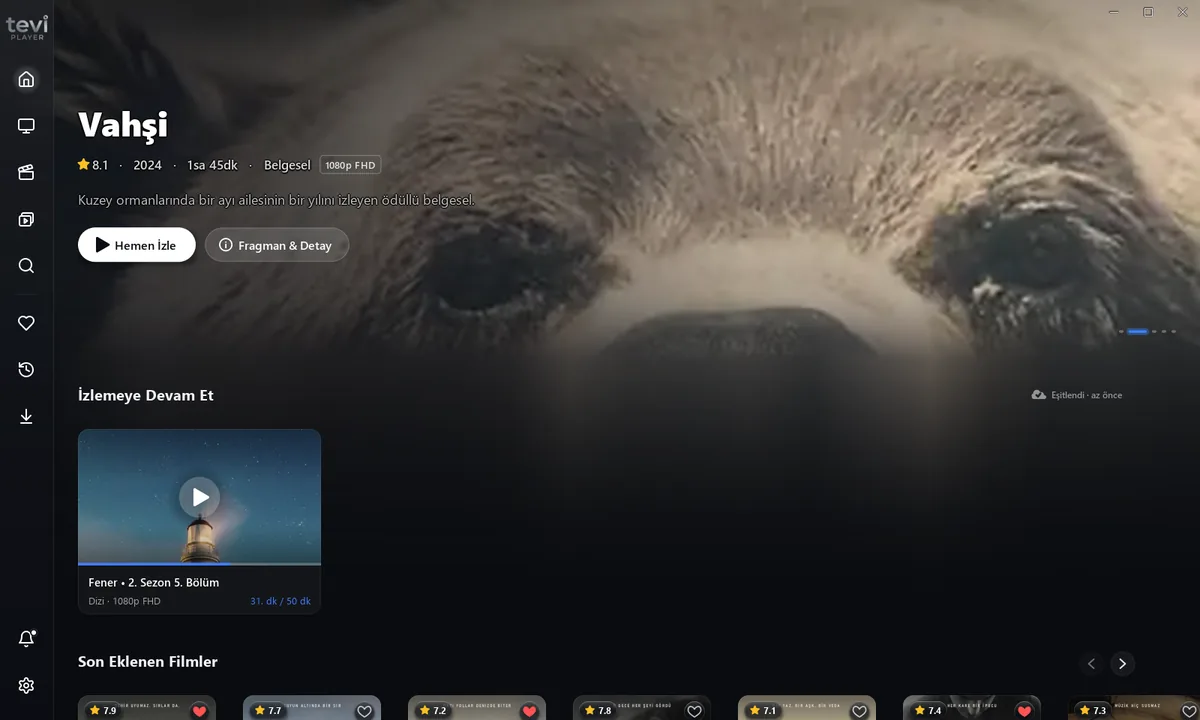
  • Separate filters for movies, series and live TV
  • Your position syncs between phone, TV and Windows
  • Remove any entry from your history
Continue Watching on Android TV: Fener, Season 2 Episode 5, minute 31
Continue Watching in the Windows app: Fener, Season 2 Episode 5, minute 31
Continue Watching row on the home screen
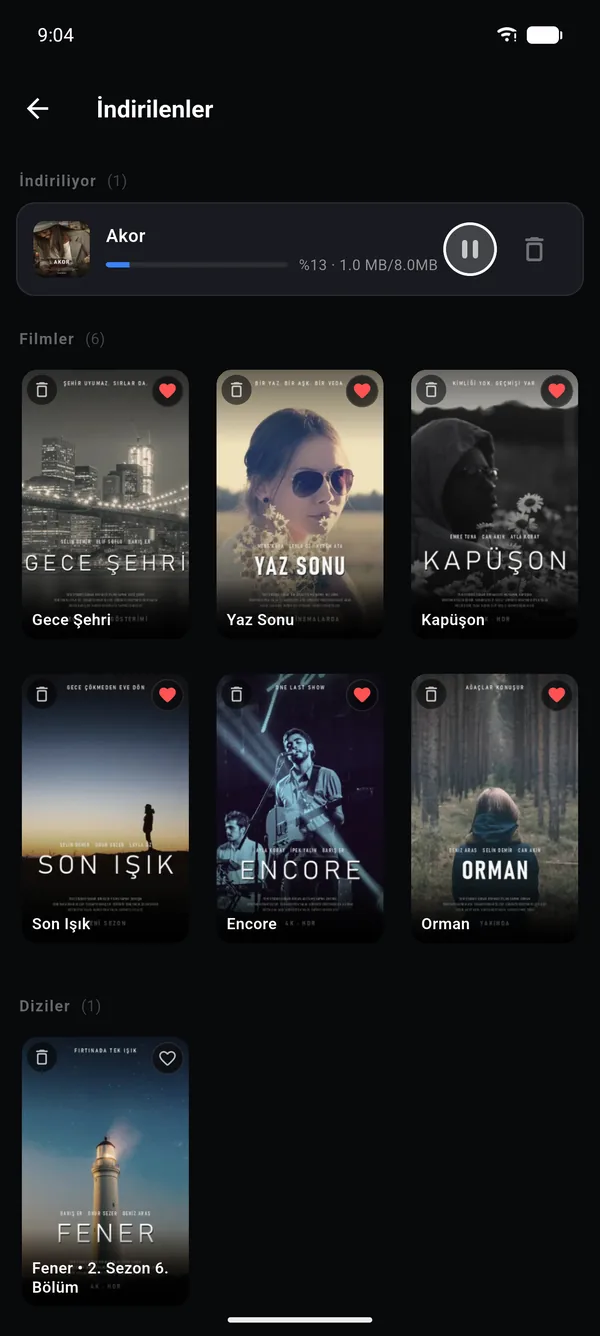
Downloads page with a movie downloading
Downloads

Download It, Watch Without Internet.

Download movies and episodes to your device and watch them on a plane, on the road or anywhere without internet. Series are kept tidy in their own folders, season by season.

  • Download movies and individual episodes
  • Each series in its own folder, split by season
  • Play with one tap from the Downloads page
Parental Control

Your Kids Are Safe, You Can Relax.

Hide adult categories from your lists completely, or lock them with a 4-digit PIN. Turning the lock off also requires the PIN, and it opens with a few presses of the remote.
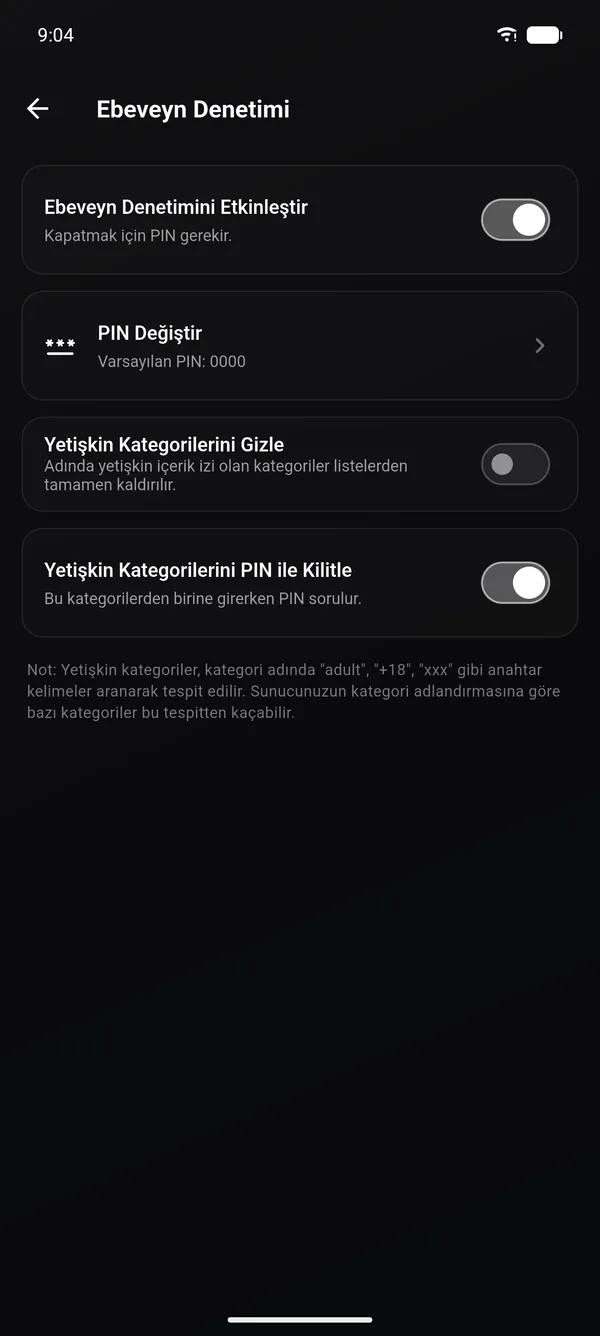
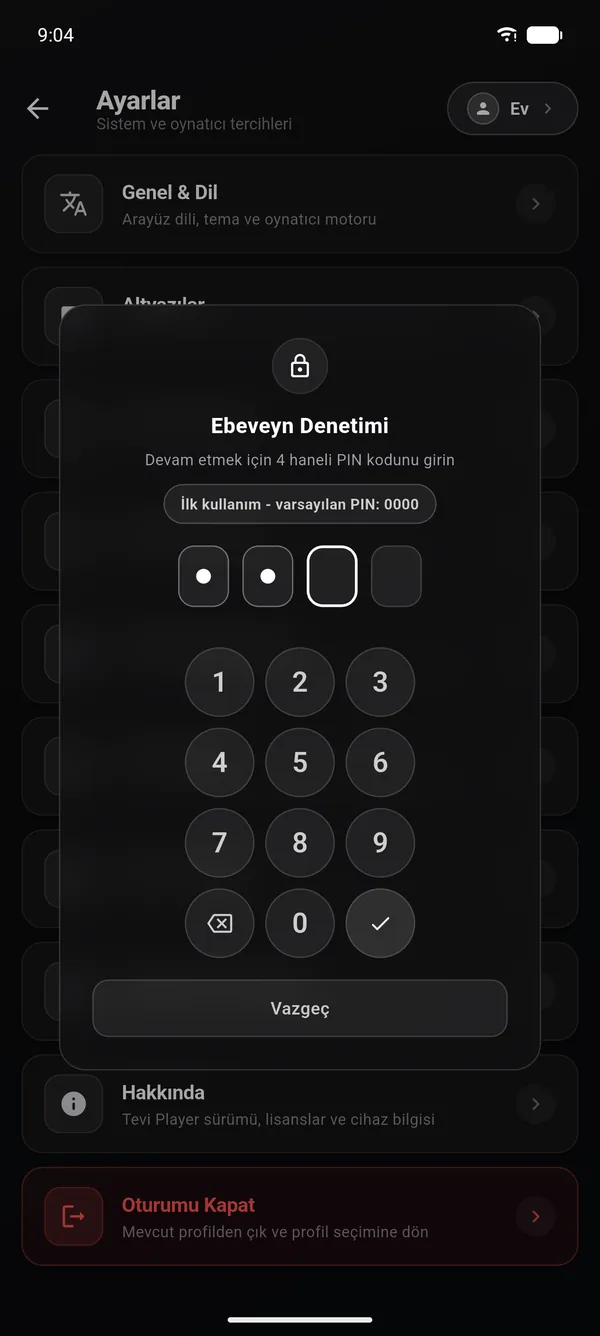
  • Hide or lock adult categories
  • 4-digit PIN you can change any time
  • Easy PIN entry with the remote

Parental control settings
4-digit PIN entry
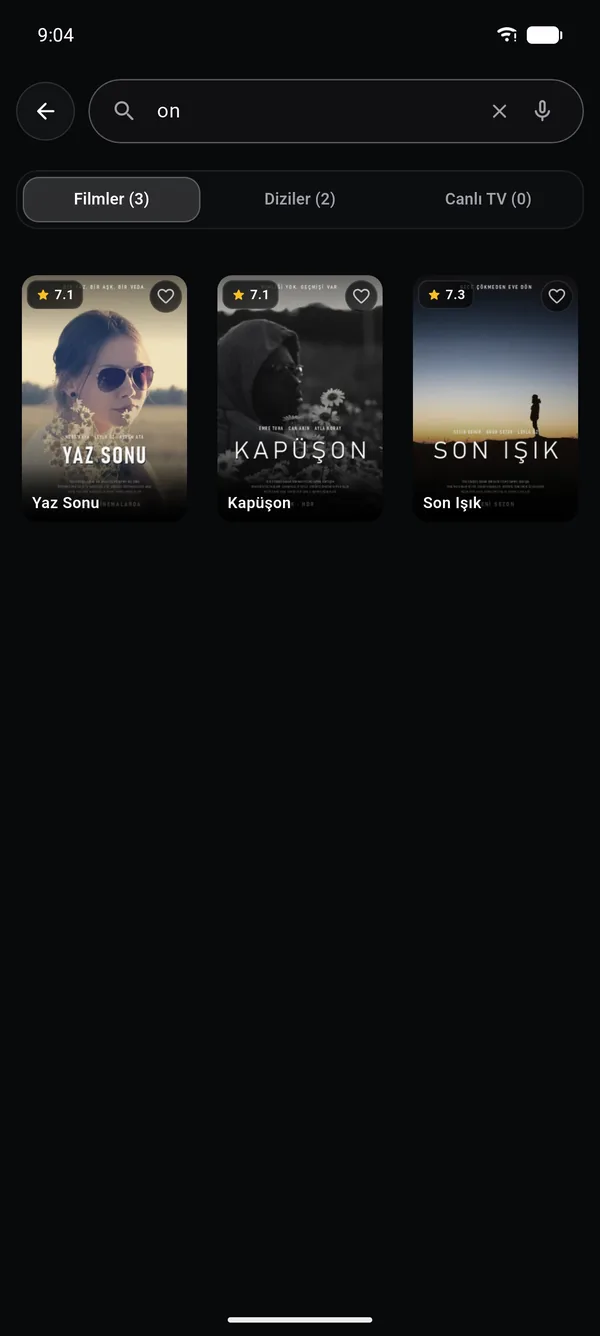
Search results: movies, series and live TV
Smart Search

One Box, Your Whole Library.

Find movies, series and channels from a single search box. Results are grouped by type as you type, or tap the microphone and search with your voice.

  • Movies, series and live channels in one list
  • Instant results as you type
  • Voice search

Everything You Want to Watch.
In One Flawless Interface.

Built over years on real TVs, listening to how real people use their remotes. Heavy menus and freezing interfaces are a thing of the past.

Live TV & Smart EPG

Live and 7-day program guide (EPG). Sort channels into categories, hide the ones you don't want with one click and pin your favorites to the top.

TV Guide (EPG) Channel Pinning Fast Zapping

Cinema & Movie Library

Wide 16:9 cinematic artwork, IMDb ratings, director, cast and full synopsis. A home-theater experience with dubbing and subtitle support.

16:9 Wide Artwork IMDb Ratings Advanced Search

Sign In in Seconds with a QR Code

No more typing an email and password on your TV. Scan the QR code on screen with your phone or enter the 6-digit code, and your TV or computer is linked to your account instantly.

QR Code 6-Digit Code My Devices

Advanced Player Controls

Audio or subtitles out of sync? Adjust lip sync to the millisecond. Aspect ratio (16:9, 4:3, Zoom), speed and volume boost at your fingertips.

Subtitle Sync Audio Enhancement Aspect Ratio

A Full Interface in 8 Languages

Turkish, English, German, French, Spanish, Portuguese, Russian and Arabic. With Arabic the interface switches to a right-to-left layout, and the remote's directions follow it.

8 Languages Right-to-Left Layout Phone · TV · Windows

Multiple Xtream Profiles

Have more than one IPTV provider or profile? Switch between them with a single tap, without typing passwords again.

Unlimited Profiles One-Tap Switch Synced to Account

Not Comparable to Ordinary Players.

Tevi Player is not a simple web wrapper. It connects directly to Android TV's native hardware drivers.

Remote Ergonomics

100% D-Pad Focused Remote Comfort

No mouse pointer or on-screen keyboard needed. Every menu glides smoothly with the standard TV remote's arrow keys (Up, Down, OK, Back).

Instant Focus
10 s Skip
Quick List
Picture Quality

Direct Output to Your TV's Own Image Processor

While most apps draw video in a web layer and drop frames, Tevi Player uses hardware SurfaceView. Your TV's motion smoothing and color calibration work directly.

Smooth 60 FPS Hardware Acceleration H.265 / HEVC Low CPU Load
Perfect Timing

Millisecond Audio Sync for Delayed Streams

On some IPTV streams the audio can arrive before the picture or the subtitles can drift. Catch perfect lip sync in ±50 ms steps with a single key in the player.

Audio Sync (±5 s) Subtitle Size & Color Multiple Audio Tracks

Supported formats, audio and subtitle limits, the remote key map, offline downloads and sync rules — all technical details on a separate page.

All technical details ›

One License, the Whole Household.

No auto-renewal traps or hidden fees. When your term ends, you alone decide whether to continue.

Monthly Plan
99 TL
every month · no commitment
  • Unlimited 4K HDR video playback
  • Up to 5 devices: Android TV, phone and Windows
  • Tevi Cloud sync
  • 7-day EPG program guide
Request Activation
Lifetime License
1.699 TL
one-time payment · forever
  • Never pay again
  • All future major updates included
  • 5 devices, unlimited Xtream profiles
  • Lifetime VIP support line
Own It for Life

The Same Quality on Every Screen.

One account on the Android TV at home, your phone or tablet on the go and your Windows PC at the office.

Android TV & Google TV

Sony, Philips, TCL, Xiaomi Mi Box, Google TV sticks and every Android 5.0+ TV box.

Remote Ready

Android Phones

Interface optimized for portrait and landscape on Samsung, Xiaomi, Huawei and every Android phone.

Touch Gestures

Tablets

Two-column navigation and a high-resolution poster layout on large-screen tablets.

Tablet Grid Layout

Windows PC

A standalone, lightweight desktop version for Windows 10 and 11 desktops and laptops.

Keyboard Shortcuts

Get Started in 3 Easy Steps.

Installing on your TV or phone takes less than 2 minutes.

1

Download the App

Open our website in your Android TV's or phone's browser and download the APK, or transfer it to your TV with a USB stick.

Android and Windows download links are at the top of the page
2

Connect Your IPTV Details

Enter your Xtream Codes server URL, username and password. You can also connect by scanning the QR code with your camera.

Your details are saved to your Tevi account, so you don't have to enter them again on your other devices
3

Start Watching Without Interruption

Your 2-hour unlimited trial starts automatically. Test 4K streams, movies and series to your heart's content without entering a card.

Time only counts down while playing

Frequently Asked Questions

The most common questions about Tevi Player and licensing.

Does the app include IPTV streams or channels?
No. Tevi Player is only a high-performance media player; it does not host or sell any streams, channels or content. To use the app you need to enter the Xtream Codes details (server URL, username, password) from your own legal IPTV provider.
Which devices and TVs does it work on?
It is fully compatible with every Android TV running Android 5.0 or later (Sony, Philips, TCL, etc.), Google TV devices (Chromecast with Google TV, Xiaomi Mi Box / Mi Stick), Android phones, tablets and Windows 10/11 computers.
How does the 2-hour free trial work?
The moment you create a Tevi account, a 2-hour (7,200-second) trial is assigned to your device and account automatically. No credit card is required. The best part: time only counts down while video is playing; the counter stops while you browse menus or search for channels.
What happens when my subscription ends?
Your app does not lock; you keep access to your channel lists, categories and favorites. Only video playback stops. When you enter a new activation code, you continue right where you left off without losing any data.
Can I use the same account on my TV and phone at the same time?
Yes. When you sign in with the same email on both your TV and your phone, your favorites, profiles and watch history sync automatically. An account can be signed in on up to 5 devices at once; if you hit the limit, use the "sign out of other devices" option in the app to free a slot. How many devices can stream at the same time is set by your IPTV subscription, not by us.
Are my IPTV username and password safe?
Your Xtream details (server URL, username, password) are saved to your Tevi account — so you don't have to type them all again when you switch to a new device. Transfer is encrypted with HTTPS. We don't share or sell this information. Your Tevi account password is hashed with PBKDF2; not even we can see it. Details in our Privacy Policy.
Does Tevi Player work with Xtream Codes and M3U links?
Yes. Tevi Player is an Xtream Codes player: just enter the server URL, username and password from your IPTV provider. If your provider gave you a single M3U (get.php) link, paste it as is; the app extracts the details from the link by itself.
Are TeviPlayer and Tevi Player the same app?
Yes, both are names of the same app. In app stores and searches it may appear as “Tevi Player”, “TeviPlayer” or “teviplayer”; the official website is teviplayer.com. It can be downloaded for free as an IPTV player for Android TV, Android phones and tablets, and Windows.

Ready to Watch?

Bring your IPTV experience up to the cinematic quality it deserves today. Try every feature without limits for 2 hours, no card required.

For subscriptions, activation codes or technical questions:
destek@teviplayer.com

When writing about a subscription, just include the email address you registered with.

Tevi Player (TeviPlayer) is an IPTV player

Tevi Player is media player software designed for watching your own IPTV subscription. It does not host, provide or sell any streams, channels, movies or series. We do not operate any content servers.

To use the app, you need the Xtream Codes details (server URL, username, password) from an IPTV provider. That subscription determines what you can watch; we only bring it to your screen.

What you buy is a license for the player software — not a content subscription.

Learn more: What is an IPTV player and how to choose one? · Xtream Codes Player · TeviPlayer in English